Wednesday, May 02, 2012

User can't login to domain because of time difference.

I saw this problem today. My User could not login to the DOMAIN because of time differences between the computer and the Domain Time.

Problem:  Privileged domain login fails with "There is a time and/or date difference between the client and server."


Cause:  This behavior can occur if the time or date is not synchronized between your computer and the domain to which you are attempting to log on. If the client computer's time or date is not synchronized with the authenticating domain controller, Kerberos validation does not succeed.


Solution:
Option 1: Do not require Kerberos
  • On the server bring up Active Directory Users and Computers
  • Bring up the user that is having problems logging in. 
  • Go to the Account Tab
  • Go to Account Options and scroll down to the check box, "Do not require Kerberos preauthentication".
  • Check this box and Apply
  • The user should be able to login.

Option 2:  User the NET TIME command on the computer as local user with Admininister Privileges.

 NET TIME /DOMAIN:name /SET   (NET TIME /DOMAIN : name /SET .. no spaces)

C:\>net time
C:\>net time \\computername /DOMAIN:yourdomain /set
C:\>net time \\computername


REF:   KB232386


Monday, April 23, 2012

Converting Blackberry BES to BIS

Howto change Blackberry Phones from BES to BIS

I've been working with several companies that are retiring their Blackberry Enterprise Server (BES) to Blackberry Internet Service (BIS). Most of these users are converting from a Blackberry to an iPhone or a Droid Phone. However a few users still need to continue receiving emails on their blackberry from the Corporate Exchange Email Server.

Using BES, the Blackberry communicates directly to the Blackberry Enterprise Server over the Internet which in turn communicates with the Corporate Microsoft Exchange Email Server. The IT Staff uses the BES to control what content appears on your Blackberry. They can keep it under tight control or allow more control to the user. They can also maintain a tight security link over secure encrypted protocols. If the Blackberry is lost, then they can lock the blackberry or delete the contents. That's why the Blackberry has been so successful in the past with Corporate Email.

Using BIS, the Blackberry communicates to the Outlook Web Access portion of the Microsoft Exchange server. There is very little control from the IT Staff. The user typically gives up Contacts and Calendar synchronization.

* Blackberry 101 See External Link: BES and BIS: What's the difference?
http://crackberry.com/blackberry-101-lecture-2-bes-and-bis-whats-difference


Here is the easiest most direct procedure:


Procedure Using your Blackberry.

1. On the Blackberry find the icon for Email Settings.
2. Email Accounts: Choose Add.
3. Choose Other
4. Enter your Email and Password: emailaddress@domain.com
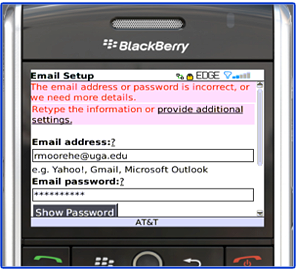
a. It will timeout with the "The Email address or password is incorrect or we need more..."
b. Click on I will provide the settings” or “provide additional settings"
Blackberry Setup
5. Select an email type: Choose “Outlook Web Access (Exchange)
6. Enter the Email address.
7.. Enter Password.
8. . Enter the Outlook Web Access URL:

ie. https://mail.nnerds.com/exchange/bucky/#

9.. Enter the Username: ** See Note
10. Enter Mailbox name: ** See Note
11. Choose NEXT
12. If you are successful you should see “Email Account Successfully Added” or it will say add another account.
13. Choose Finish
14. Go back to the Blackberry Main screen and see if your account is added. You should start receiving emails.


** Note
Sometimes the Username and the Mailbox name are different.

I've seen a company use first_lastname@company.com for the email address
The Username: FirstLastname
The Mailbox: First_Lastname


More info and Frequently Asked Questions:

Question: How do I sync my Calendarwith BIS?

Answer:
1. Thismethod requires a Google Gmail Account. It also requires you to add the Gmail account to your BlackberryBIS.

2. You useGoogle Calendar as your main Calendar on your Blackberry

3. Download and install a utility called GoogleCalendar Sync to run on your desktop which synchronizes your Outlook CLACalendar Items to your Google Gmail Calendar.

4. Where do I get Google Calendar Sync?


Question: Where can I login to BISon the WEB?

Answer:
Most Common ServiceProvider’s BIS website:

More info on BIS:


GenerialBIS Frequently Asked Questions:

Verizon -Configure email services – Blackberry Internet Service (BIS)


Sponser:
VISIT the NNERDS - Neighborhood Nerds
http://www.nnerds.com


Thursday, February 09, 2012

Friday, November 11, 2011

How to Interpret 11/11/11 aka 11-11-11; Friday, November 11, 2011. Eclipse Schedule. Metaphysics Experiment. 11:11

How to Interpret 11/11/11 aka 11-11-11; Friday, November 11, 2011. Eclipse Schedule. Metaphysics Experiment. 11:11

The number eleven is the fifth prime number (contrary to popular belief, the number one ( 1 ) is not a prime number).

The base numeric number system lends itself to some interesting peculiarities as relates to the number eleven.

Base 10 for example:

(2 digits) 11 x 11 = 121

(6 digits) 111111 x 111111 = 12345654321

(9 digits) 111111111 x 111111111 = 12345678987654321

Base 16 (hexadecimal) for example:

(2 digits) 11 x 11 = 121

(6 digits) 111111 x 111111 = 12345654321

(9 digits) 111111111 x 111111111 = 12345678987654321

Thursday, September 15, 2011

The feature you are trying to use is on a CD-ROM that is not available


Problem:


The feature you are trying to use is on a CD-ROM that is not available
Insert the 'NewCopy_CDA' disk and click OK


if click OK than get this screen


! An installation package for the product NewCopy_CDA cannot be found. Try the installation again using a valid copy of the installation package "newcopy_CDA.msi'


The error stays on the screen.


Cause:

The Startup portion of the Registry HKLM was forcing HP Software Update to load -

C:\Program Files\HP\HP Software Update\HPWuSchd2.exe


Troubleshooting:

In Task Manager examine what the new source of NewCopy_CDA is. Go to processes, found out it was HPWUCli.exe which is the HP Software Update Client


Solution:

Disabled HP Software from loading with the System Conifuration Utility.


Wednesday, March 24, 2010

Novell Unveils ZENworks Configuration Management Virtual Appliance - PR Newswire (press release)

Novell Unveils ZENworks Configuration Management Virtual Appliance - PR Newswire (press release): "


Novell Unveils ZENworks Configuration Management Virtual Appliance
PR Newswire (press release)
In addition, Novell announced key ZENworks enhancements to help customers migrate to Microsoft* Windows* 7. Finally, Novell announced a technology preview ...

and more »
"

The ZENworks Configuration Management virtual appliance is designed to simplify installation and reduce the support and maintenance costs associated with endpoint management. Built with SUSE® Studio™, the industry's fastest growing appliance-building program, the ZENworks Configuration Management virtual appliance runs on a VMware* ESX infrastructure and seamlessly integrates desktop, asset and patch management capabilities.